CyberFreezeDev Loading
  1. Home
  2. Comparisons
  3. OCR vs intelligent document processing

OCR vs intelligent document processing for invoices, IDs and forms

OCR turns a page into text; document processing turns mixed documents into checked, usable data.

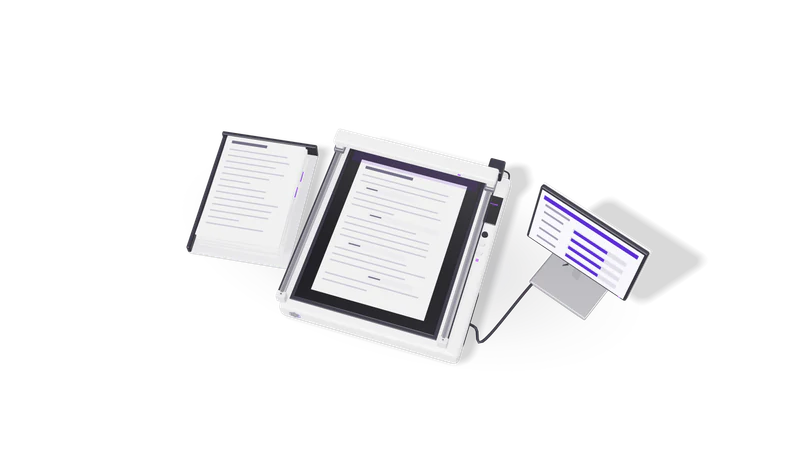
3D render of a paper stack and a scanner bed whose light bar reads fields into a record card

The short answer

OCR is enough for searchable text. If someone still retypes numbers from the output into another system, you need intelligent document processing.

Read more about The short answer

OCR (optical character recognition) reads the characters on a scanned page or photo and gives you text, sometimes with positions. It does not know that 33ABCDE1234F1Z5 is a GSTIN, that the number beside Total is the invoice total, or that page 3 belongs to a different document.

Intelligent document processing (IDP) wraps OCR in everything else a business needs: sorting documents by type, extracting named fields, checking them against rules and your own records, sending doubtful cases to a person, and exporting clean data to Tally, an ERP or a CRM.

In the OCR vs intelligent document processing choice, plain OCR is enough when you only need searchable text. If a person still has to read the OCR output and type numbers into another system, you need IDP. Our OCR and document intelligence service builds the second kind.

Side by side

Compared onOCRIntelligent document processing
OutputText, sometimes with word positions and confidenceNamed fields in a fixed schema: vendor, GSTIN, invoice number, date, line items, taxes, total
Document typesAny page, treated the sameClassifies each document first: invoice, credit note, bank statement, PAN, Aadhaar, form
LayoutsLayout-agnostic textHandles varying layouts from many suppliers without a template per supplier
ValidationNoneChecks totals against line items, GST arithmetic, GSTIN format, dates, duplicates
Human reviewNot built inA review queue for low-confidence or failed checks
Output destinationA text file or searchable PDFTally, an ERP, accounting software, a CRM or a spreadsheet
Typical toolsTesseract, cloud OCR servicesOCR plus layout models or language models, rules, a review screen and integrations
Best forArchives, search, simple fixed formsAccounts payable, KYC onboarding, claims, application forms

Where each one wins

OCR wins for searchable archives

Searchable PDFs from old scans are cheap and enough when people only need to find pages.

Read more about OCR wins for searchable archives

If you have ten years of scanned files and want to find every letter that mentions a customer, OCR into searchable PDFs is cheap, fast and enough. Nobody needs fields; they need to find the page.
OCR wins for one fixed form

Zonal OCR and a few rules can handle one form you designed yourself.

Read more about OCR wins for one fixed form

If every document is the same form you designed, with boxes in the same place, zonal OCR plus a few rules can be simpler than a full IDP system.

IDP wins on supplier invoices

The same fields from a hundred invoice layouts, with unsure ones flagged instead of failing silently.

Read more about IDP wins on supplier invoices

A business with a hundred suppliers receives a hundred invoice layouts, some as PDFs, some as phone photos of thermal-paper bills. IDP extracts the same fields from all of them and flags the ones it is unsure about, instead of failing silently.

IDP wins on checks you would otherwise do by hand

GSTIN structure, tax arithmetic, place of supply and duplicates checked before entries reach the books.

Read more about IDP wins on checks you would otherwise do by hand

A GSTIN is 15 characters: a two-digit state code, the PAN, an entity number, a default letter and a check character. IDP can verify that structure, check the state code against the place of supply, confirm CGST plus SGST or IGST adds up, and catch a duplicate invoice number before it reaches your books.

IDP wins when a person must stay in control

Only low-confidence fields go to a reviewer, shown beside the page image.

Read more about IDP wins when a person must stay in control

For KYC documents, insurance claims or medical forms, you want a person to confirm low-confidence fields. IDP routes only those fields to a reviewer with the image beside them, rather than asking someone to re-check every page.

What an IDP pipeline does with one invoice

Fig. 01 Overhead: fields read off the page fill rows on the record card
  1. 01 Receive

    Files arrive by email, WhatsApp, upload or folder, and the original is stored untouched.

    Read more about Receive

    The PDF or photo arrives by email, WhatsApp, upload or a shared folder. The pipeline stores the original untouched.

  2. 02 Read

    Digital PDFs give text directly; scans and photos are cleaned up and read by OCR.

    Read more about Read

    Digital PDFs give their text directly; scans and photos go through OCR, with deskewing and contrast correction for phone pictures.

  3. 03 Classify and extract

    A model identifies the document type and fills a fixed schema, including line items.

    Read more about Classify and extract

    A model decides the document type and pulls out the fields in a fixed schema, including line items as a table.

  4. 04 Validate

    Rules check arithmetic, tax splits, GSTINs, dates, duplicates and the vendor name.

    Read more about Validate

    Rules check arithmetic, tax splits, GSTIN structure, dates and duplicates, and match the vendor against your master list.

  5. 05 Review

    Failed or low-confidence fields go to a person, shown beside the highlighted page area.

    Read more about Review

    Anything that failed a check or came back with low confidence goes to a person, who sees the field next to the highlighted area of the page.

  6. 06 Post

    Approved data goes to Tally or your ERP with a link to the original.

    Read more about Post

    Approved data is written to Tally, the ERP or accounting software, with a link back to the original document for audit.

How the costs are structured

OCR is cheap per page; IDP adds models, rules, integrations and reviewer time. Measure cost per correctly posted document, not per page.

Read more about How the costs are structured

OCR is cheap per page. Open-source Tesseract has no licence fee and runs on your own server. Cloud OCR and document services such as AWS Textract, Google Document AI and Azure AI Document Intelligence bill per page, with higher per-page rates for features such as table, form or custom field extraction.

IDP adds layers on top: a language model or layout model for extraction (billed per token or per page if cloud-hosted, or a fixed hardware cost if run privately), the engineering to build validation rules and integrations, a review screen, and most importantly the time reviewers spend on flagged documents. That last cost is the one to design for. A pipeline that sends every document to review saves little; one that confidently posts wrong numbers is worse than none.

So the right measure is not cost per page but cost per correctly posted document, including review time.

What we recommend and why

We build IDP with human review always included, and prefer private models for Aadhaar, PAN, medical forms and client financials.

Read more about What we recommend and why

We build IDP for documents that end up as entries in another system, and we always include human review. One of our anonymous client builds is an OCR pipeline for invoices, IDs and forms where a person reviews flagged fields before anything is posted. We do not hide that step; it is what makes the output trustworthy.

For sensitive documents such as Aadhaar, PAN, medical forms or client financials, we prefer running extraction on a private model so images do not leave your infrastructure, which also simplifies DPDP Act 2023 questions.

If your goal is getting purchase bills and expenses into your books, look at Fint, where an AI agent drafts expenses from bills and a person confirms them, or our GST and accounting automation service for a custom pipeline into Tally. For the definition, see intelligent document processing.

Questions

Can OCR read handwriting?

Modern OCR and vision models read clear handwriting reasonably well and struggle with rushed or cramped writing. For handwritten forms we plan for a higher share of fields going to human review.

Do we need a template for each supplier's invoice?

Not with current IDP. Language and layout models extract fields from layouts they have not seen before. Templates still help for one very high-volume document where you want maximum consistency.

Can this post directly into Tally?

Yes. We build integrations with Tally, so approved invoices and expenses can be pushed as vouchers with the original document linked. We recommend a review step before posting, at least until accuracy on your documents has been measured.

How accurate is it?

It depends on your documents: clean digital PDFs extract very well, crumpled phone photos of thermal bills less so. We measure accuracy on a sample of your own documents before go-live rather than quote a general figure.

Last updated