CyberFreezeDev Loading
  1. Home
  2. Services
  3. OCR and document intelligence

OCR and document AI for invoices, ID cards and forms

Documents read and checked automatically; only the doubtful ones reach a person.

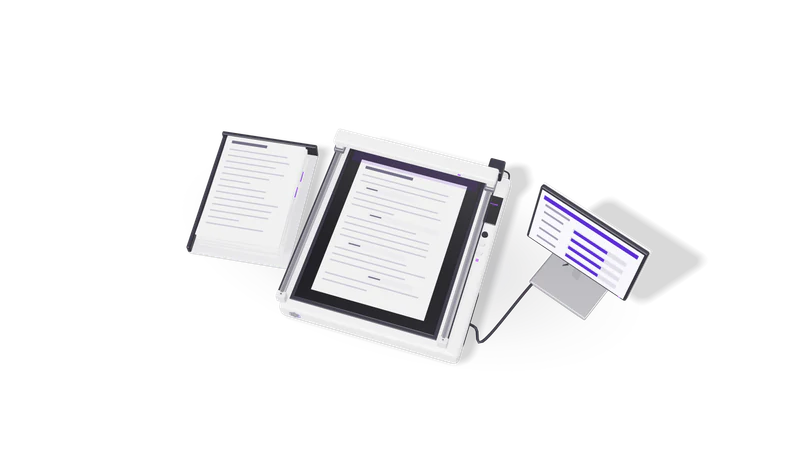
3D render of a paper stack and a scanner bed whose light bar reads fields into a record card

At a glance

OCR and document intelligence
Inputs
PDF (digital and scanned), JPG, PNG, HEIC, TIFF, email attachments
Documents
GST invoices, bills, PAN and ID cards, bank statements, forms
Reading
OCR engines plus vision language models, chosen per document
Checks
GSTIN and PAN format, totals, tax split, dates, duplicates
Review
Side-by-side screen for low-confidence fields
Outputs
JSON, CSV, Google Sheets, database rows, accounting entries
Deployment
Cloud APIs or fully on your own server

What OCR and document intelligence covers

OCR turns pixels into text. Document intelligence turns that text into fields you can trust.

OCR reads every word. Document intelligence finds the fields you need, checks them, and sends failures to a person with the image.

Read more about What OCR and document intelligence covers

Plain OCR gives you every word on the page in reading order. That is useful for search, but your accounts team does not need every word. They need the vendor's GSTIN, the invoice number, the date, the taxable value, CGST, SGST or IGST, and the total, in the right columns.

Document intelligence is the layer that finds those fields, whatever the layout, and then checks them. Does the GSTIN have 15 characters in the right pattern? Do the line items add up to the taxable value? Is this the same invoice number from the same vendor you already booked last week? A field that fails a check, or that the model was unsure about, goes to a person with the image next to it.

The extracted data then feeds the rest of your process: bills into accounts (our GST and accounting automation work picks up from here), KYC details into onboarding, or claim forms into an approval workflow.

Documents we handle and what we check

DocumentFields we extractChecks before it is accepted
GST invoices and billsVendor, GSTIN, invoice number and date, HSN or SAC, taxable value, tax, totalGSTIN pattern, line totals, CGST and SGST versus IGST, duplicate invoice numbers
PAN cardsName, PAN, date of birthTen-character PAN pattern, name matched to the application
Aadhaar and other IDsName, ID number, addressNumber format; Aadhaar masked to its last four digits before storage
Bank statementsDate, narration, debit, credit, balanceRunning balance reconciles line by line
Application and claim formsFields specific to your form, ticks, signatures presentRequired fields filled, values within allowed ranges
Prescriptions and lab reportsPatient name, date, items listedAlways sent for human review; never auto-accepted

Handwriting, poor photos and stamps over text lower accuracy. We measure it on your own documents before promising anything.

How a project runs

Fig. 01 Overhead: fields read off the page fill rows on the record card
  1. 01 Collect a real sample

    Past documents as they really arrive: good scans, bad photos, multi-page PDFs.

    Read more about Collect a real sample

    You share a set of past documents that represents what actually arrives: good scans, bad phone photos, multi-page PDFs, different vendors. We sign an NDA first if you want one, and personal data stays on systems you approve.

  2. 02 Label the fields that matter

    Agreed fields, formats and rules become the test set every version is scored on.

    Read more about Label the fields that matter

    We agree the exact fields, formats and rules with the people who use the data. That labelled sample becomes the test set every version of the pipeline is scored against.

  3. 03 Choose the reading method per document

    Text extraction, OCR or a vision model per document type, chosen by measurement.

    Read more about Choose the reading method per document

    Clean digital PDFs often need no OCR at all, just text extraction. Scans and photos go through an OCR engine or a vision language model. We pick per document type by measuring on your sample, not by preference.

  4. 04 Add checks and the review screen

    Validation, duplicate checks and a side-by-side screen for correcting and approving.

    Read more about Add checks and the review screen

    Validation rules, duplicate detection and a review screen where a person sees the image and the extracted fields side by side, corrects them and approves.

  5. 05 Connect the output and go live

    Approved data written to your systems, with a record of every correction.

    Read more about Connect the output and go live

    Approved data is written to your sheet, database or accounting system. Every document keeps a record of what was read, what was corrected and by whom.

Where it fits, and where it does not

Good fit

Dozens or hundreds of documents a day, in known types, keyed in by hand.

Read more about Good fit

Dozens or hundreds of documents a day in a handful of known types, where someone currently keys the data in. CA firms handling client bills, clinics digitising intake forms, insurers and lenders collecting KYC, and logistics teams reading delivery paperwork.

Poor fit

A few documents a week, or handwritten archives that only need search.

Read more about Poor fit

A few documents a week. A good template and a careful person is cheaper. Also archives of mostly handwritten notes where nobody needs structured fields, only search.

Sensitive documents

IDs, medical and financial records processed on your own server with open-weight models.

Read more about Sensitive documents

ID cards, medical records and financial statements can be processed entirely on your own server with open-weight models, so nothing is sent to an outside API. See custom AI systems for how we deploy private models.

Arriving by WhatsApp or email

Documents picked up from a mailbox or WhatsApp, with a request for clearer photos.

Read more about Arriving by WhatsApp or email

Many documents arrive as chat photos or attachments. The pipeline can pick them up from a mailbox or a WhatsApp number and reply when a clearer photo is needed.

Example engagement

Described without the client's name, as agreed.

An OCR pipeline for invoices, IDs and forms where failed or low-confidence fields go to a reviewer before anything moves on.

Read more about Example engagement

We built an OCR pipeline for invoices, ID documents and forms with human review. Documents are read, fields are checked against format and arithmetic rules, and anything that fails or falls below the confidence threshold is queued for a reviewer who sees the original image beside the extracted values. Only approved records move downstream.

OCR and document AI is also one of the research tracks at CyberFreeze Labs, where we test new models against the same kinds of Indian documents before they reach client work.

Questions

How accurate is it?

It depends on your documents, so we do not quote a number before measuring. We score the pipeline on your labelled sample and show you field by field where it is reliable and where it needs review. Low-confidence fields always go to a person.

Can it read handwriting and regional languages?

Printed Tamil, Hindi and other Indian scripts can be read by current OCR engines and vision models with varying quality; handwriting is harder. We test on your samples and route handwritten fields to review by default.

Can we store Aadhaar numbers from the cards we collect?

Aadhaar use is regulated by UIDAI. Our default is to mask all but the last four digits before anything is saved, and to keep the original image only if you have a lawful reason to. Your compliance team or advisor should confirm what you may keep.

Does it work with Tally?

Yes. We build integrations with Tally so approved purchase bills can be posted as vouchers instead of being retyped. A person still approves the entry.

Do our documents leave India?

Only if you choose a hosted model whose servers are elsewhere. We can run the whole pipeline on a server in India or in your own office if the data must stay local.

Last updated